Budget Rules
Who is this for?
This SOP is designed for marketers, advertising specialists, and e-commerce business owners who are actively managing Amazon advertising campaigns and are looking to optimize their budget allocation, enhance campaign performance, and drive sustainable business growth through the strategic implementation of budget rules.
What Is Budget Rules:
Budget rules are predefined parameters or guidelines set by advertisers to manage and control their advertising spend on various campaigns. These rules are designed to ensure that budgets are allocated effectively, limit overspending, and optimize the performance of campaigns by making data-driven decisions based on specific performance metrics.
The Objective of Advertising Budget Rules SOP:
The objective of this Standard Operating Procedure (SOP) for Advertising Budget Rules is to establish a systematic and consistent approach to managing advertising budgets on Amazon. This SOP aims to provide a clear understanding of budget rules, their implementation, and their benefits, enabling marketers to make informed decisions that maximize the return on investment, improve campaign performance, and contribute to overall business growth.
Two types:
Schedule-based rules - set budget in advance for special events such as Prime Day or based on the custom period
Performance-based rules - Allow to set up rules to increase Sponsored Product campaign budgets only when your campaigns meet a certain performance threshold such as
advertising cost of sales (ACOS)
click-through rate (CTR).
conversion Rate (CVR)
Metrics are calculated using the data from the previous 7 days with a minimum budget of $10.
The most commonly used type is the Performance-based rules through advertising cost of sales (ACOS).
Budget rules are evaluated once a day to calculate the daily budget for the next day according to the conditions set. If the rule doesn’t meet the conditions set, the daily budget specified for the campaign will apply.
Example of Performance-based rules (ACOS based)
Step 1
Find a well-converting campaign.
Go to an advertising account
Date Range - Last 7 days
Use ‘Filters by’
Filter by ‘Advertising cost of sales (ACOS)
Select ‘less than or equal to’
For this example will be anything below 10%

Step 2
Select the campaign that you want to add a budget rule.
Preferably low ACOS that has a good track record consistent low ACOS of
7 days
14 days
30 days
ACOS in the last date range above should not be more than 10%
Step 3
Do a quick optimization check and ensure that targeting of keywords or ASINs is not going more than the increased ACOS range of 10%. If there are any non-performing keywords, kindly adjust them accordingly to avoid a spike in ACOS.
Step 4
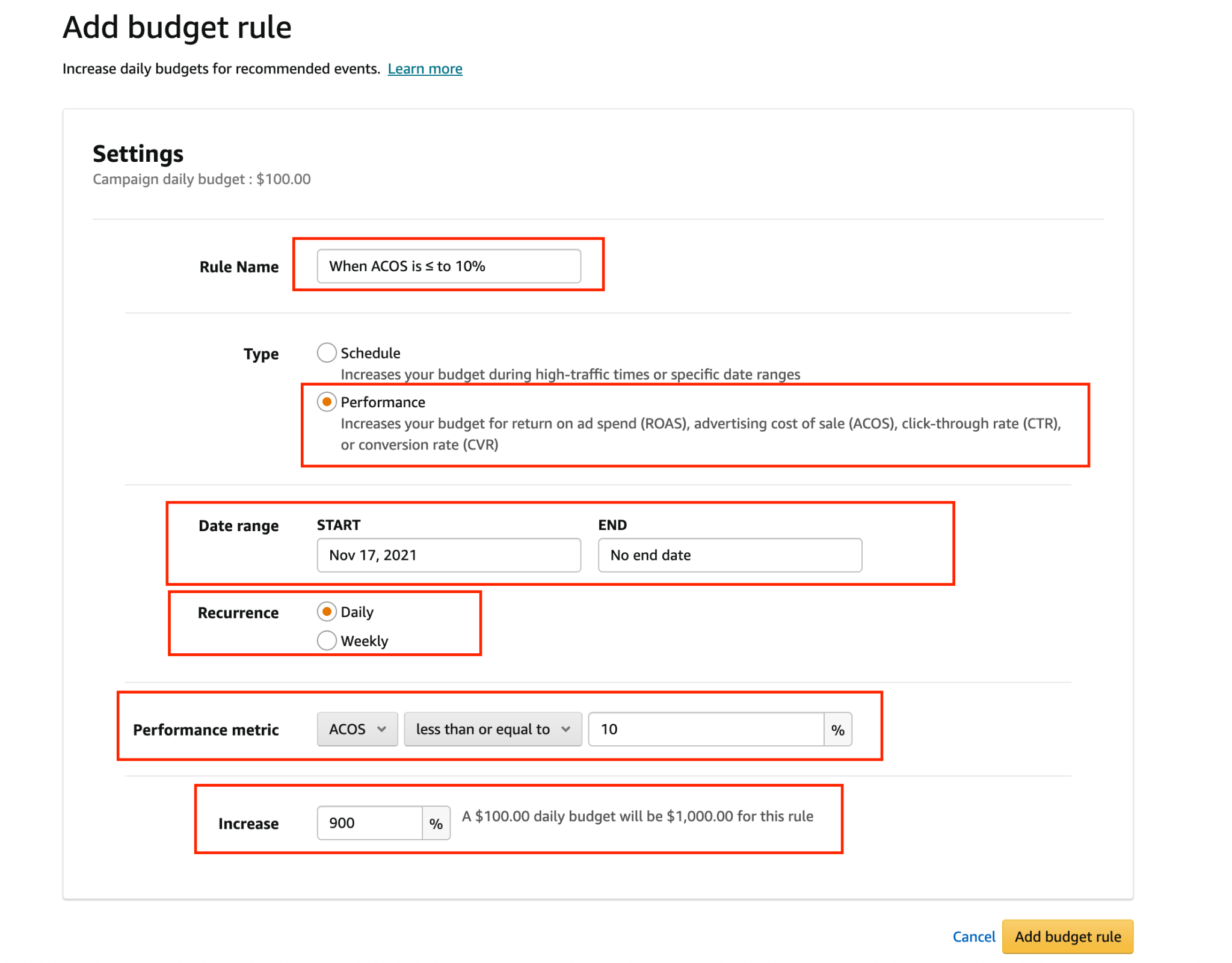
Click the Budget rules tab
Click the Add budget rule tab

Fill in the information such as
Rule Name - Any title you want to remind your rule
Type - this will be Performance-based
Date Range - Date where you want to start. Typically, I leave this open-ended.
Recurrence - Daily
Performance metric - set to ACOS less than or equal to 10
Increase- by about at least 100 - 200%.
A $10 daily budget with a 100% increase will become $20 USD
H&H Rule #1
Rule Name: Below 18% ACOS & Orders > 3
Type: Performance
Date Range: today for start and leave the end open ended
Recurrence: Daily
Performance metric: ACOS less than or equal to 18%
Increase: 900%
 Step 5
 Step 5
Once the budget rule is clicked successfully, the budget rules tab will show all the information you set it for.

Please note that the budget rule is not a one-size-fits-all and has to be used based on data and analysis.
