Amazon Vine invites the most trusted reviewers on Amazon to post opinions about new products to help their fellow customers make informed purchase decisions. Amazon invites buyers to become Vine reviewers, also known as Vine Voices, based on the insightfulness of the reviews they published on their Amazon purchases. If you participate, you can provide free units of your products for this selected group of Vine Voices to post customer reviews for the products you submit. You can build awareness of your product, boost the sales of your slow and cold start ASINs, and help customers make informed decisions about new products you offer by participating in Vine.
Here are some prerequisites to participate in Vine:
You must be a Professional Selling Partner
You must have registered a brand in the Amazon Brand Registry
You must be identified as a brand owner
You must have eligible FBA offers
Before implementing, it is important to communicate, and get client’s approval. Include the approval proof (screenshot or fireflies call link) as Task Details or as a Comment.
REMINDER
Once your enrollment is complete, Vine Voices will have the opportunity to request your enrolled products for review. After the first Vine review is published, you will be charged a $200 enrollment fee once per parent ASIN. You will not be charged a fee if the enrolled product does not receive any reviews within 90 days of enrollment.
To be eligible, the items you enroll in must meet the following criteria:
Be brand registered in the Amazon Brand Registry
Have fewer than 30 reviews on the product detail page
Have a buyable FBA offer in "New" condition
Not be an adult product
Have already launched at the time of enrollment
Have available inventory
Have an image and a description
HOW TO ENROLL IN VINE
Access the Amazon Seller Central page by clicking the URL: https://sellercentral.amazon.com/
Once there, you will be asked to log in. Log in using the client's Amazon login.
Once you are logged in, the landing page should look something like this:

Hover over the Advertising tab, and select Vine.

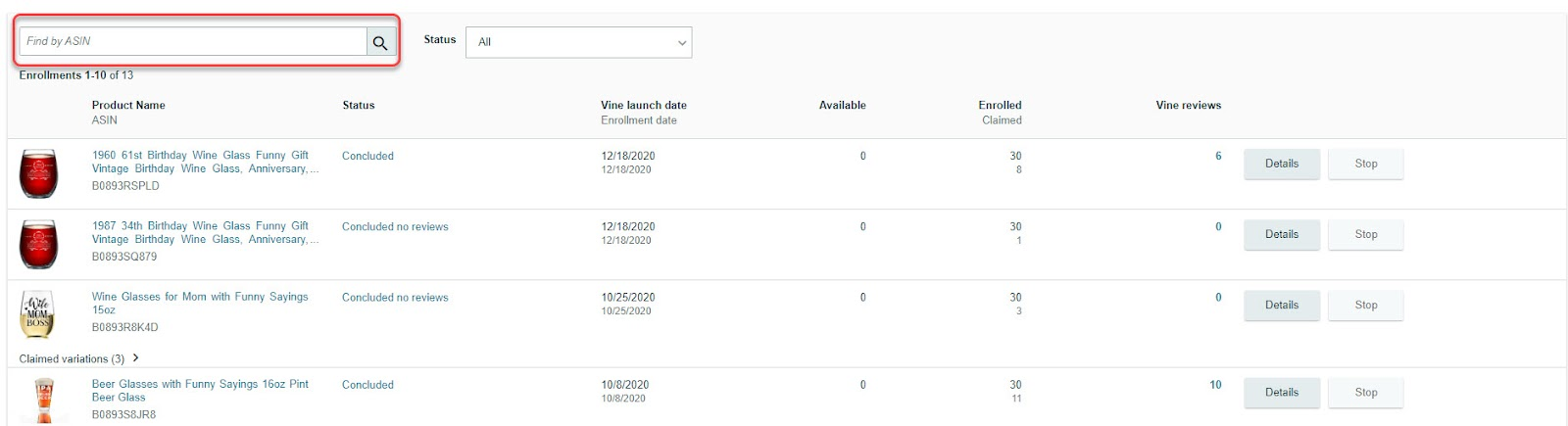
We can search if the ASIN has been enrolled in Vine before.
You can only register an ASIN once only.
To enroll an eligible ASIN, type/paste the ASIN in the provided space, just underneath the account name.

Once ASIN is displayed, supply the necessary information, and then click Enroll button to proceed.
Tick the small box beside the image listing.
Input the number of units to enroll
Maximum number of 30

You will be routed again to the Vine page, and it will display the status of Vine enrollment.


VINE ENROLLMENT FEE FOR SELLERS
Vine enrollment fee is charged once per parent ASIN enrollment.
FEE DETAILS
Units Enrolled | Maximum number of units available to be ordered by Vine reviewers (minimum 1 and maximum 30) |
Time of Charge | Seven days after the publication date of the first Vine review for the ASIN enrollment |
Fee structure | Rate is based on the number of units enrolled per ASIN enrollment |
Rate card (until October 18, 2023)
Enrollments created before October 19, 2023, are subject to $200.
Rate card (effective October 19, 2023)
Vine enrollment fee will be charged once per parent ASIN depending on the number of units enrolled. The fees will be charged seven days after the first Vine review is published.
Units Enrolled | Vine Enrollment Fee |
1-2 | 0 |
3-10 | $75 |
11-30 | $200 |
Fee example
Example 1: Seller enrolls three units for a parent ASIN with no child ASINs and receives one Vine review within 90 days.
Seller will be charged $75 seven days after the publication date of the first Vine review.
Example 2: Seller enrolls two units for a parent ASIN with no child ASINs and receives two Vine reviews within 90 days.
Seller will not be charged for the enrollment as they enrolled two units at parent-ASIN level.
Example 3: Seller enrolls two units for the parent ASIN with five child ASINs and receives two reviews for the enrollment.
Seller will not be charged for the enrollment as they enrolled two units at parent-ASIN level.
Note: In Example 3, Vine reviewers can place up to two orders on any of the five child ASINs enrolled under the parent-ASIN and submit up to two reviews on the enrollment.
