Who is this for? Individuals who are creating Amazon Promotion Codes.
Objective: This SOP will guide you through a systematic, step-by-step process on how to create a product selection for items eligible for the promotion code.
To create a Product Selection, prepare a list of your ASINs or SKUs that fit into one of the Product Selection Types such as the SKU List, ASIN List, Browse Node ID List, Brand Name List, or Advanced Product Selection.
1. Go to the top menu of Seller Central, hover the "Advertising" tab, and select "Promotions" from the drop-down menu. 2. Click the "Manage Product Selection" tab at the top of the table provided on the next page.
3. Click Product Selection Type. From the drop-down menu, you may select which list you are using as the selection of items included in the promotion.
- SKU List
- ASIN List
- Brand Name List
- Browse Node ID List
- Advanced Product Selection
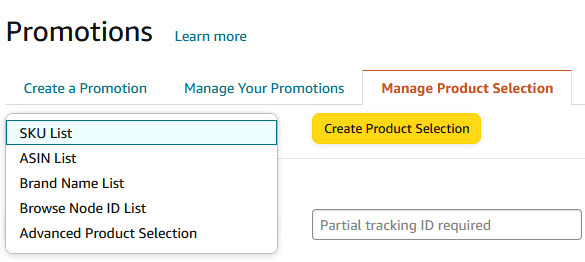
4. Click the "Create Product Selection" button.
5. On the next page, name your Product Selection or Tracking ID to identify it easily when creating a Promotion.
6. Create an Internal Description to explain what this Product Selection refers to and make it easier for you to identify it.
7. Add your Product SKUs or ASINs, Browse Node IDs, Brand Names, etc. in the next block. 8. If you chose the "Advanced Product Selection" Type, choose "all" or "any" from the Drop-Down Menu provided under the Internal Description field that reads, "Include the products that match X of the following conditions."
9. Select the necessary Product Selection Type again from the Drop-Down Menu alongside the "Add another condition using" field, and input the relevant data or identifiers again in the block provided.
10. Click the "Add another" button alongside the Drop-Down Menu to add more conditions until you fill in as many Product Selection Types as you want for this Product Selection.
11. After checking all of your information, click the "Submit" button in the bottom left side of the page.
12. To go back to your Product Selection Page or cancel this entry, click the "Manage Product Selection" button at the top of the page.
