LOST ITEMS
1. Go into your Amazon seller account. Then hover over Reports and click on Fulfillment.
2. From the Inventory header, select Inventory Ledger.
3. Click the "Download" link from the Inventory Ledger page.
4. Make sure to select the following:
- Type of Report: Detailed View
- Event Type: Adjustments
- Date Range: Exact Dates (go back as far as you can and select the present day)
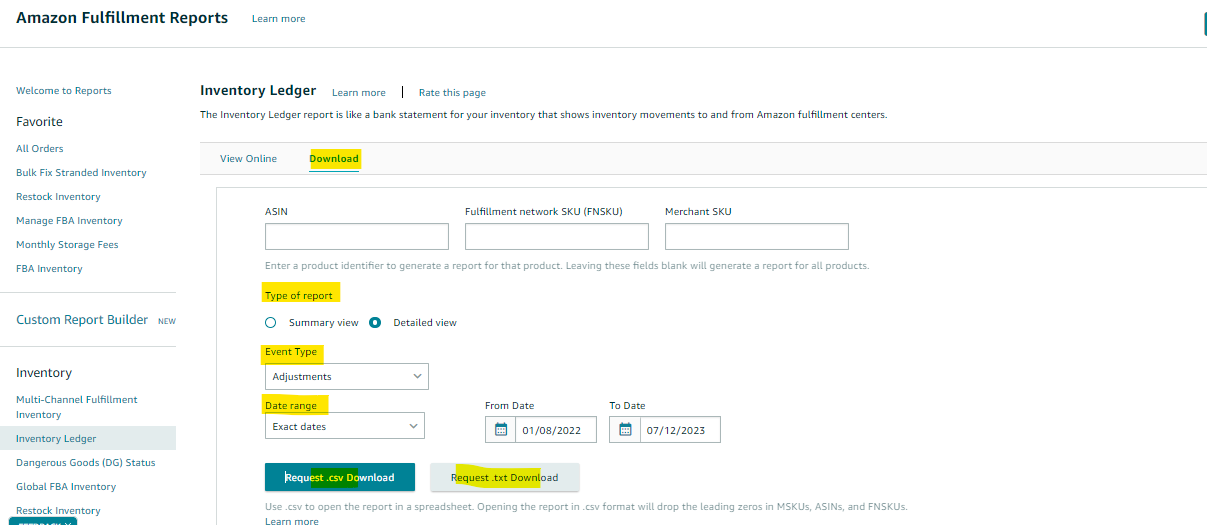
5. Click on Request csv or txt Download button. Open the file, and filter the "Reason" column to "M" and "5". Then, filter the "Unreconciled Quantity" column to 1 or more. Make sure to delete duplicates under the data "FNSKU" column. See sample file below.
6. Once you have all the transaction/reference id, request reimbursement for lost inventory by going to this link https://sellercentral.amazon.com/help/hub/reference/GGEV4254LJJ9BAEG
7. Scroll to the bottom of the page and look for "Investigate an Item Lost in Warehouse"
8. Enter the FNSKU (one by one) and click "Continue"
9. Amazon will come back with their findings:

10. Click on the “Create a Case” button.
11. If successful, a case will be created. It will either be approved to reimburse the account or a “further investigation is needed” one. It will look like this:
OR
 12. This will most often be instant reimbursement to your account.
DAMAGED ITEMS
Reimbursement for damaged inventory follows a similar process. You can use the exact same list you generated above.
1. Simply filter the "Reason" column to include values 6, 7, E, H, K, U, and filter the "Unreconciled Quantity" column to 1 or more. Also, ensure to delete duplicates under the "FNSKU" column in the data. See sample file below.
2. Go to this link again: https://sellercentral.amazon.com/help/hub/reference/GGEV4254LJJ9BAEG
3. Copy each Transaction/Reference ID and paste them in the box under “check warehouse damaged reimbursement status”, and request reimbursement.

4. Amazon will let you know if the transaction id is eligible for reimbursement:

5. Click on “Continue”.
This only works for FBA SKUs so if you get a drop-down menu to choose an SKU, pick the FBA SKU. If successful, a case will be created for the claim. You can review it in the case log. The case will look like this:

