Who is this for? Individuals who are running Amazon Social Media Promotional Codes.
Objective: This SOP will guide you to cancel an ongoing Amazon Social Media Promotion.
To cancel a Social Media Promo Code, follow these steps:
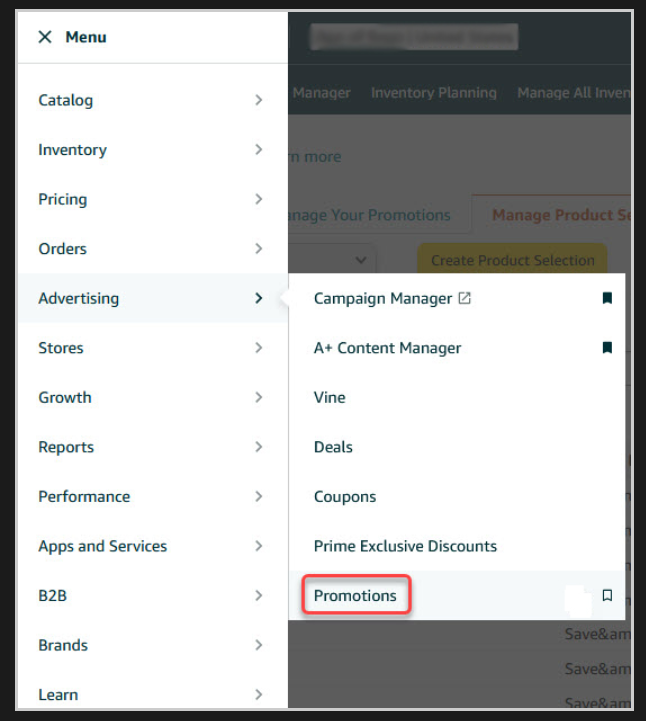
- Go to the top menu of Seller Central, hover the "Advertising" tab, and select "Promotions" from the drop-down menu.
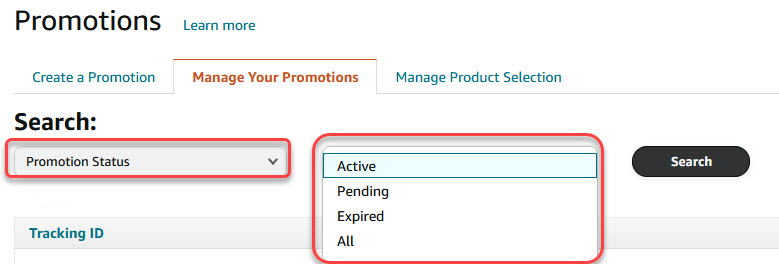
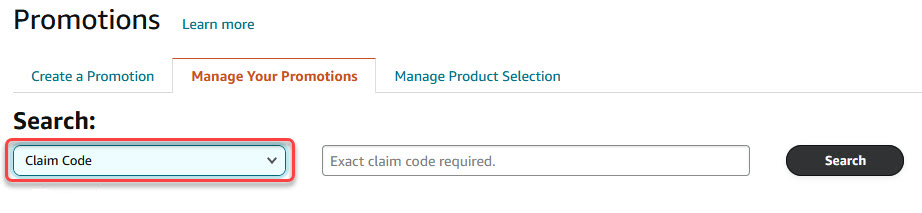
- Under the "Manage your Promotion" tab, their several ways to search for the ongoing Amazon Social Media Promo.
- Search based on Promotion Status.
- Search based on Claim Code.
- Search based on Date Range.

- Search based on Promotion Status.
- Click the Tracking ID of your Social Media Promo Code Promotion or click the "Edit" button to the right of the Promotion you wish to edit.

- On the Social Media Promo Code Promotion Page, click the "End this Promotion" button to cancel it.

- A pop-up window will appear asking you to confirm that you want to cancel the Promotion. Click the "Submit" button to cancel and end your Social Media Promo Code Promotion.
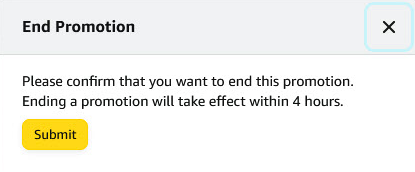
- It will take around 4 hours delay for the promotion to end.

