Who is this for? This SOP is intended for individuals who manage FBA (Fulfillment by Amazon) listings and are responsible for updating package dimensions and weight to lower FBA fees and get reimbursements.
Objective: The objective of this SOP is to provide clear and concise instructions for updating package dimensions and weight for FBA listings to lower FBA fees and get reimbursements, using one of the three available methods: manual edit, feed file, and calling seller support, or Cubiscan request.
Note: Package dimensions and weight updates are only applicable for FBA listings.
3 Ways to Update the Package Dimensions and Weight
1. Manual Edit
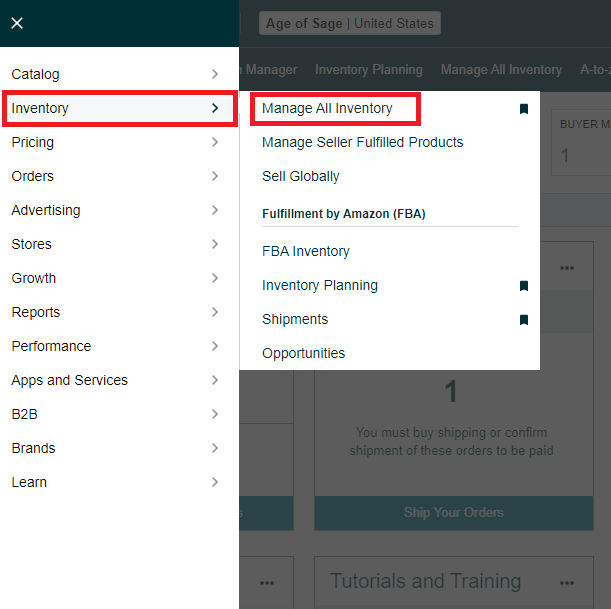
Go to “Manage All Inventory”
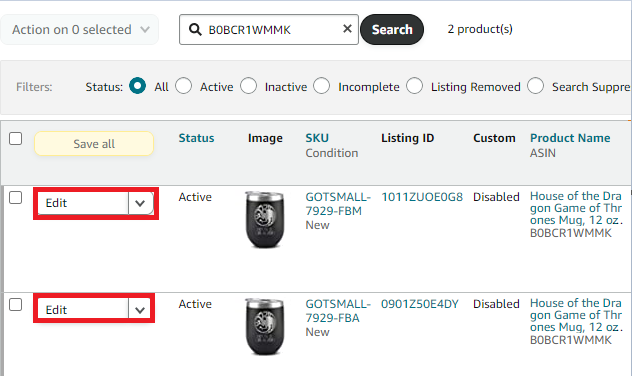
- Search for the ASIN or the FBA SKU and click Edit
- Go to “More Details” and look for “Package Dimensions” & “Package Weight” (NOT “Item Dimensions” & “Item Display Weight”)


- Key in the correct dimensions and weight and then click “Save and finish”
- Wait for 15 minutes to 24 hours before the changes reflect on Amazon’s end.
2. Feed the File & Calling Seller Support
- Download a Category Listing Report (CLR). Request CLR through Reports > Inventory Reports.
- Search the FBA SKU in the CLR and go to its Fulfillment section:

- Key in the dimension values and weight values and save the file.
- Go to Inventory>Add Products via Upload>Upload your Inventory File>Upload the CLR File>Input your email address>Click Upload File.
- Get the batch ID (for reporting purposes and see the error message if any)
- If successful, wait 15 minutes to 24 hours before the changes reflect on Amazon’s end.
- If NOT, go to SC Help, file a case, and call/email SC support to push the changes
3. Cubiscan Request
- Please click the link below to get more information about Cubiscan Request:
