Amazon Advertising Reports
Who is this for? This SOP is designed for Amazon advertising professionals responsible for managing advertising campaigns. It is also relevant for anyone involved in monitoring and analyzing advertising performance, including marketing managers, data analysts, and other stakeholders.
Objective: The objective of this SOP is to provide clear guidelines for creating Amazon advertising reports that will enable effective monitoring and optimization of advertising campaigns. The report will help track advertising performance and provide insights for making data-driven decisions to improve ROI.
What launched? You can now understand how your Sponsored Products' impression share compares to other advertisers with the search term impression share report, now available in the Report Center.
Why is it important?
The report shows how your account-wide impression share for each search term compares to other advertisers, and the overall percentage of ad impressions you receive compared to other advertisers over a selected time period. For example, if you have a Sponsored Products impression share of 20% for a search term on a given date, it means that you won 20% of all Sponsored Products ad impressions for that search term on that date. Similarly, if you have a search term impression rank of 3 on a search term, it means that you received the third most Sponsored Products ad impressions for the same search term on that date.
You can download the Search Term Impression share report from the Report Center in the advertising console.

Budget Report:
Essentially this report just allows us to know what Amazon recommends the budgets to be for potential budgets where they are at currently.
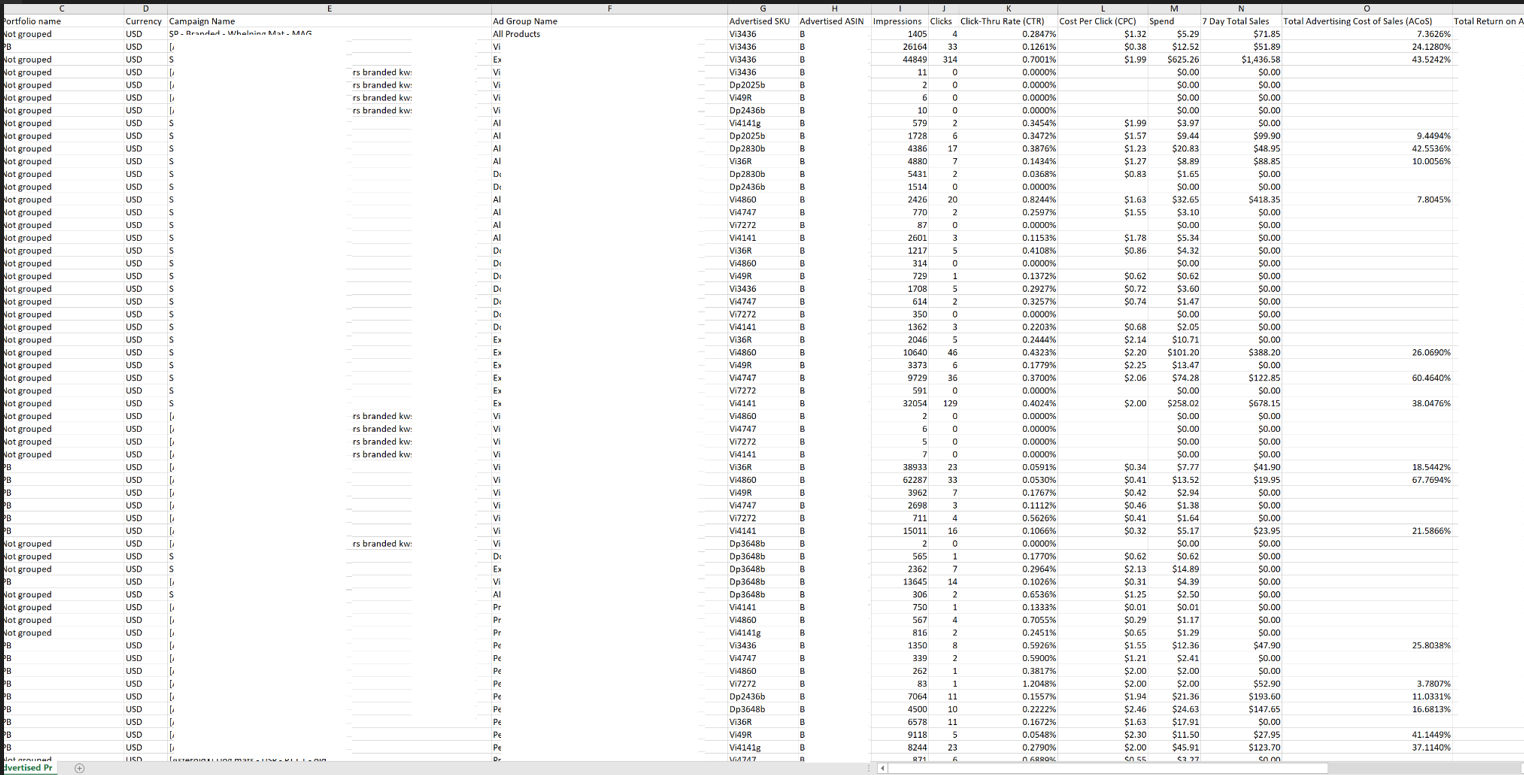
Advertised Product Report
ASIN or SKU is in, the Advertised Product Report is your best friend!
If you have ever wondered how you can know which campaigns or ad groups. This report will show you which campaign/product group that each SKu and or ASIN is in, and also gives metrics for each.
This report can help you save a lot of time.
Targeting Reports and Keyword Reports
Targeting reports (for Sponsored Product campaigns) and similarly, keyword reports (for Sponsored Brand campaigns), provide detailed insights into sales and performance metrics for targets in all campaigns that received at least one impression.
Download these reports to see how your targets and keywords have performed over the past 90 days — this can help you adjust your bid and expand your targets to improve your campaign’s overall performance.
The targeting report shows you everything you are targeting for each of your campaigns, including keywords, categories, or specific ASINs. Unlike Search Term reports, these won’t show your customers’ search terms.
Targeting reports provide you with the following metrics:
Date
Portfolio name
Campaign Name
Ad Group Name
Targeting
Match Type
Impressions
Clicks
Click-Thru Rate (CTR)
Cost Per Click (CPC)
Spend
Total Advertising Cost of Sales (ACoS)
Total Return on Advertising Spend (RoAS)
7-Day Total Sales
7-Day Total Orders (#) etc.
Targeting reports help you understand how your targets are performing over time, so you can optimize your bids, identify any duplicate keywords, and detect other potential issues with your listings.
For instance, if you have a keyword with a high click-through rate but low impressions, it could mean your bid for that target is too low — it’s enticing, but not enough customers are viewing it. By increasing the bid, you stand to get more impressions.

Also, pay attention to the targets that do not have an ACoS. This means that customers are clicking on your ads, but for whatever reason, they’re not purchasing your product. These keywords are eating up your ad budget — move them to your negative keyword list so your ad spend can go toward targets that convert.
Keywords that gain a lot of impressions and clicks but no sales could also indicate that there’s something wrong with the listing, or that the target is too broad. Make sure your listing is fully optimized and contains helpful content customers are looking for. Is your price too high? Are your images poor? See what improvements you can make to encourage conversions.
Over time, as you remove poor-performing keywords from your campaigns, you’ll notice your ACoS decrease, and your overall daily budget last longer.
Source: https://www.junglescout.com/blog/amazon-advertising-ppc-reports-guide/
Placement report
Location, location, location: depending on your bid, your Sponsored Product ads could show up at the top of Amazon search results, somewhere in the middle or near the bottom, or on a competitor’s product detail page. The placement report compares your ad’s performance based on its location.
For example, if your ad performs better when shown at the top of the search results, this report will let you know. You can take that knowledge and adjust your bids to increase your chances of winning the top of search placement.
Placement reports data is available for the last 90 days.
Source: https://www.junglescout.com/blog/amazon-advertising-ppc-reports-guide/
Campaign report
The campaign report gives an overview of your campaign’s performance as a whole. It’ll show you where you need to optimize or where you may benefit from a bigger budget.
For Sponsored Brands, campaign report data is available for the last 60 days. For Sponsored Products, campaign reports data is available for the last 18 months.
Source: https://www.junglescout.com/blog/amazon-advertising-ppc-reports-guide/
Performance over time report
If you want the broadest overview of your ad spend and performance, use this report. You’ll be able to view the clicks, cost per click (CPC), and spending for all of your Sponsored Products Campaigns.
Overall, this is not a report I would recommend focusing on when trying to optimize your PPC campaigns — it’s not as detailed as other reports, and the insights aren’t as helpful.
Performance over time report data is available for the last 90 days.
I know that is a lot of information we just threw at you, but understanding all of your options as a seller will help you implement the most effective advertising strategies.
Source: https://www.junglescout.com/blog/amazon-advertising-ppc-reports-guide/
